
Internet access on a phone can become a real limitation while travelling in your own country or abroad. Coverage may disappear in mountains and sparsely populated areas, while international mobile roaming outside the European Union can still be expensive. A map and GPS navigation become most valuable precisely when the network is unavailable.
Google Maps lets you download an area to your phone and use it when the connection is slow or absent. GPS does not need mobile data to establish your position, but the map must be prepared in advance and the whole intended route must fit within the saved area.
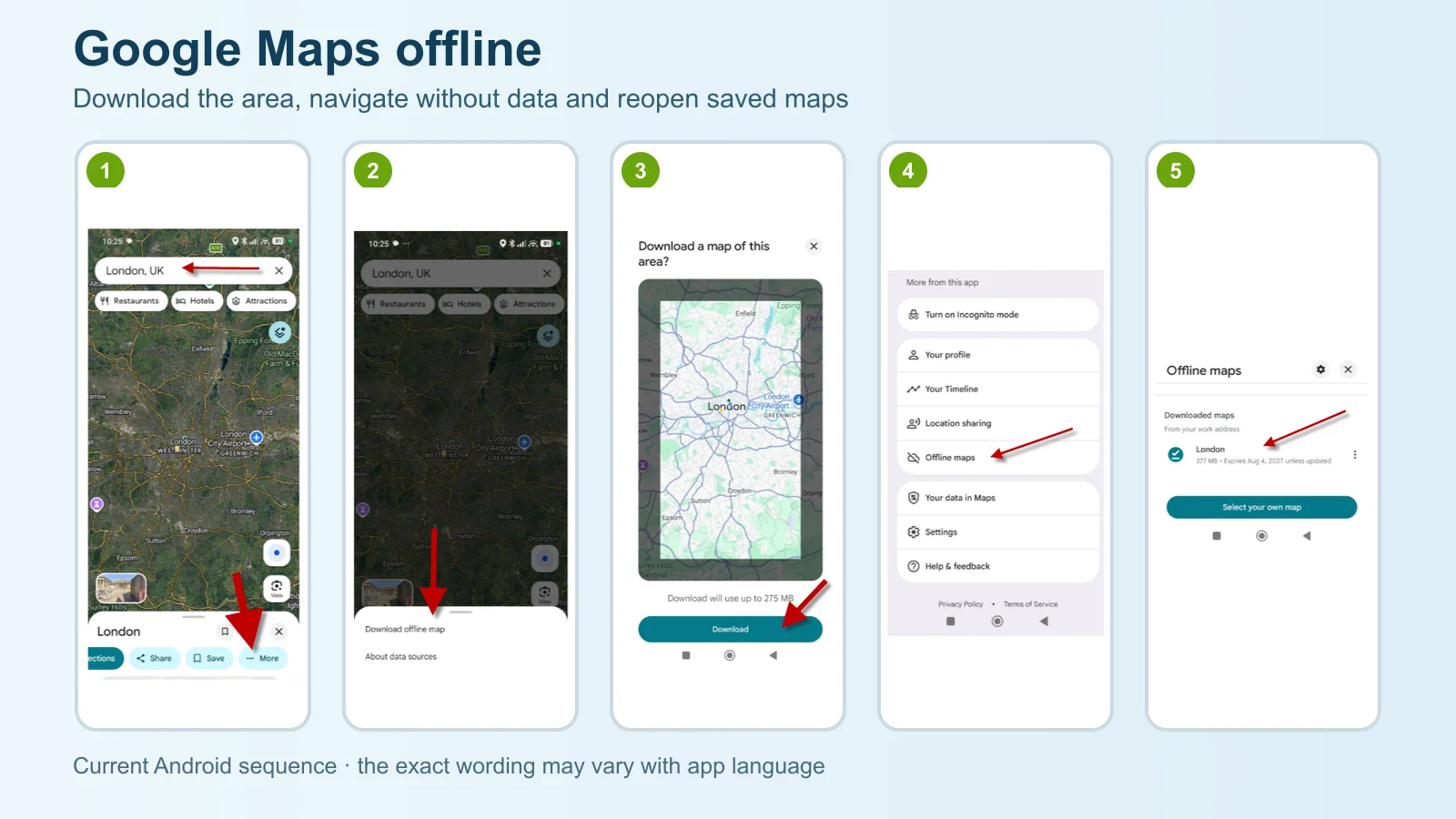
Search for the place, open its information sheet, scroll through the actions and tap More → Download offline map → Download. Alternatively, open your profile picture and choose Offline maps → Select your own map, frame the area and download it. Return to Profile picture → Offline maps to find it later.
Before downloading the map
Open Google Maps while you are still online and sign in to your account. On iPhone and iPad, downloading is unavailable in Incognito mode. Prefer a Wi-Fi connection, check free storage and save a slightly larger area than the planned route: a diversion, airport or accommodation can easily sit just outside a tight selection.
- update the Google Maps app;
- search for the destination city or place;
- include start, finish and possible diversions in the frame;
- check the estimated download size before confirming;
- test the map in airplane mode before leaving.
How to download an area in Google Maps
This example searches for London. The screenshots use the current Android app; the route on iPhone and iPad is very similar. The exact wording and placement can change slightly with the operating system, app version and language.
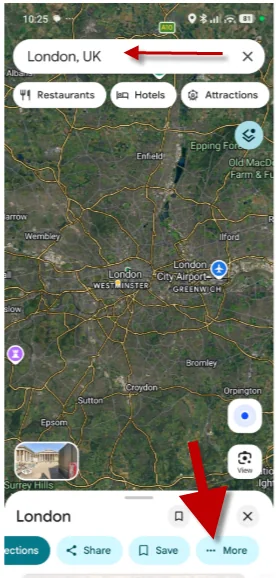
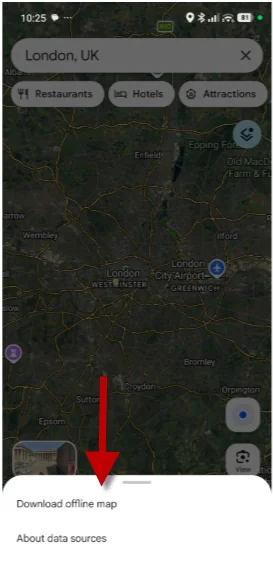
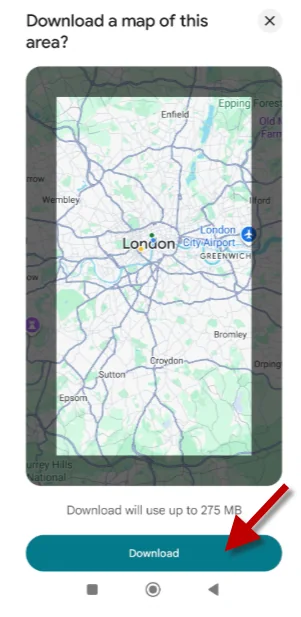
There is no single fixed area size or megabyte figure: both depend on the place and its level of detail. If the required frame is too large, create two or more overlapping downloaded areas.
The alternative route
You can also tap your profile picture, open Offline maps, choose Select your own map, adjust the frame and tap Download. This is the easiest method when you want to define the area without starting from a city information sheet.
How to reopen a downloaded map
After the download, use Google Maps normally. When internet access is slow or unavailable, the app uses the cartography stored on the device. Follow these two steps to view the list, check expiry or manage the files.
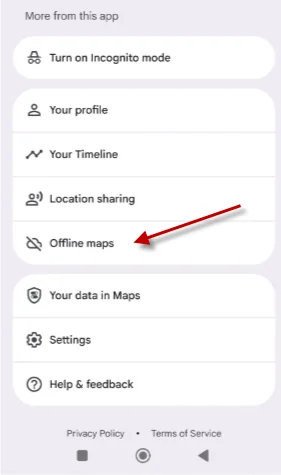
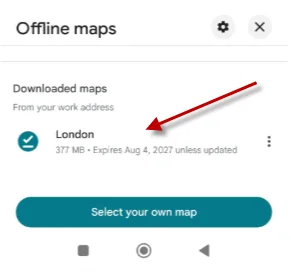
To start an offline journey, search for the destination as usual or open a place already visible in the area. Driving navigation only works when the complete route lies inside the downloaded map.
What actually works offline
| Feature | Offline | Condition or limit |
|---|---|---|
| GPS position | Yes | The phone needs a satellite signal; the first position can take longer. |
| Driving navigation | Yes | The whole route must lie inside the downloaded area. |
| Traffic and alternative routes | No | They require current information from the network. |
| Walking, cycling and public transport | No | Google excludes these directions from offline navigation. |
After downloading, turn on airplane mode for a few minutes, leave location enabled and request a route inside the area. It is the quickest way to find a missing section or incomplete download before travelling.
Storage, Wi-Fi and offline-map updates
Google Maps displays the estimated size before downloading. Android saves maps to internal storage by default. On Android 6.0 and later, an SD card configured as portable storage can also be used, but changing the storage destination requires the areas to be downloaded again.
Open Profile picture → Offline maps → Settings to enable automatic updates and choose download preferences. When an offline map has 15 days or less remaining and the phone is connected to Wi-Fi, Google Maps tries to update it automatically. If that fails, select the area in the list and tap Update.
The actual date appears beside each map, so a fixed number of days is not a reliable rule. Before travelling, check its expiry, available storage and completed status—especially if the area was saved a long time ago.
Frequently asked questions
Does a phone's GPS work without internet access?
Yes. The satellite receiver can determine your location without mobile data. For navigation, however, Google Maps must already contain the whole route inside a downloaded area.
Which directions work in Google Maps while offline?
Driving navigation works offline when the entire route lies within the downloaded area. Walking, cycling and public-transport directions are unavailable, as are traffic information and alternative routes.
Do Google Maps offline maps expire?
Yes. They must be updated before the date shown in the list. When an offline map has 15 days or less remaining and the phone is connected to Wi-Fi, Google Maps tries to update the area automatically.
Can offline maps be downloaded in every country?
No. Google says downloads may be unavailable in some countries or regions because of contractual limitations, language support, address formats or other reasons.
How much storage does an offline map use?
It depends on the size and detail of the selected area. Google Maps shows an estimate before downloading; Android can also save maps to an SD card configured as portable storage.